How to Find Out What WordPress Theme a Site Is Using
The reliable way to identify a WordPress theme, including child themes, renamed theme folders and custom builds.

Article Summary: To find what WordPress theme a site uses, look for /wp-content/themes/ in its page source. The folder after it names the theme, and that folder's style.css file lists the theme's real name, author, version and website. A WordPress theme detector does both steps for you and handles child themes.
- WordPress themes live in /wp-content/themes/ followed by a folder name, visible in the page source.
- Every theme's style.css file starts with a header listing Theme Name, Author, Version and Theme URI.
- A Template line in style.css marks a child theme and names its parent theme.
- WordPress VIP sites nest themes one folder deeper, in /wp-content/themes/vip/.
WordPress runs a large share of the web, and its themes are easy to identify once you know where to look. Unlike Shopify, a WordPress theme describes itself in a plain text file that anyone can open.
Method one: use a WordPress theme detector
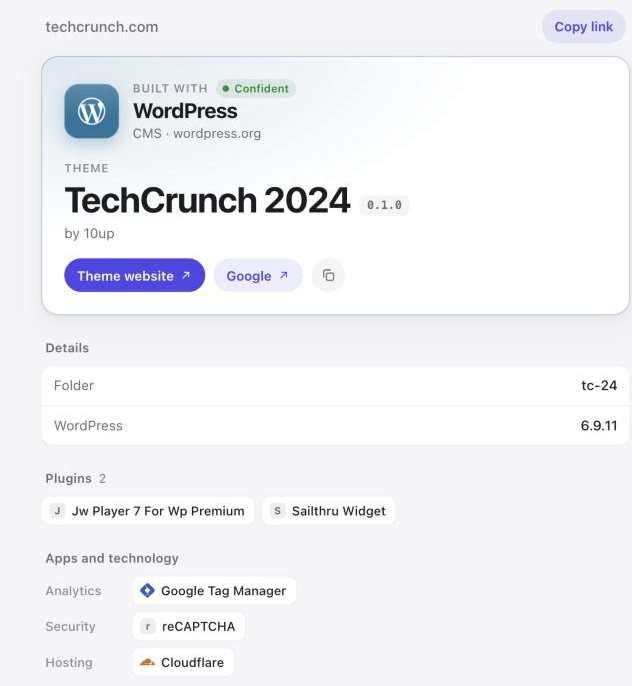
Paste the site into Any Theme Detector. It finds the active theme folder, opens the theme's style.css and reads its header, then shows the theme name, version, author and a link to the theme's website or a marketplace search. It also lists the plugins it can see and marks WooCommerce stores.
Method two: find the theme folder in the page source
Open the page source with Ctrl+U on Windows or Option+Command+U on a Mac, then search for /wp-content/themes/. You will find stylesheet or script addresses like this:
<link rel="stylesheet" href="https://example.com/wp-content/themes/astra/style.css?ver=4.8.1">The folder name after /themes/ is the theme's slug, here astra. Slugs are usually close to the theme's name, but not always: a developer can rename the folder.
Method three: read the theme's style.css header
Take the theme folder address and add style.css to it, then open it in your browser. Every WordPress theme starts its style.css with a header comment like this one:
/*
Theme Name: Astra
Theme URI: https://wpastra.com/
Author: Brainstorm Force
Version: 4.8.1
Template: (only on child themes)
*/WordPress itself requires this header, as the WordPress theme handbook explains, so it is present on almost every site. It is the most trustworthy source of the theme's name because it is what WordPress reads too.
Handling child themes
Many sites don't edit their theme directly. They create a child theme that inherits everything from a parent and adds small changes. You can spot one in two ways:
- The page source shows two theme folders, such as
astraandastra-child. - The child theme's style.css contains a
Template:line naming the parent folder.
The parent is the theme you can actually buy or download, so that is the one to look up. Any Theme Detector shows the parent as the result and lists the active child theme in the details.
When the folder name doesn't help
Three situations make a WordPress theme harder to pin down:
- Renamed folders. Some developers rename the theme folder, so the slug says little. The style.css header usually still names the original theme.
- Custom themes. Publishers and agencies often build themes from scratch. Their headers name the brand or agency, for example "TechCrunch 2024 by 10up".
- WordPress VIP. Large publishers on Automattic's VIP platform keep themes in
/wp-content/themes/vip/, one folder deeper than usual.
Our roundup of famous websites built with WordPress shows how often big sites use custom themes.
Getting the theme for your own site
If the theme has a Theme URI pointing to wordpress.org or the developer's site, you can usually download or buy it there. For premium themes without a link, search the theme name on a marketplace. Child themes are rarely sold, so get the parent theme and make your own changes.
H Launch WordPress on HostingerBudget friendly managed WordPress. Partner link.Frequently asked questions
How do I find out what WordPress theme a site is using for free?
Paste the site into a free WordPress theme detector, or open its page source, search for /wp-content/themes/ and open that folder's style.css to read the theme header.
Why does the detector show a different name than the folder?
The folder name is only a slug. The style.css header holds the theme's real name, which can differ, especially for premium themes and child themes.
Can I find a WordPress theme if the site hides it?
Security plugins can hide some signs, but themes still load their files from the theme folder. If a site truly blocks every sign, it is usually a custom or headless build.
How do I know if a site uses a child theme?
Look for two theme folders in the page source, or a Template line in the style.css header. The Template value is the parent theme's folder.
Keep reading
 WordPressHow to Find Which WordPress Plugins a Site Is UsingHow to read a site's WordPress plugins from its page source, plus the limits every plugin detector runs into.
 WordPressFamous Websites Built With WordPress, and Their ThemesReal scan results for 20 famous WordPress sites, from NASA to Variety, with their themes, authors and hosting.
 GuidesWhat CMS Is This Website Using? How to Check Any SiteThe fingerprints of every major CMS and site builder, in one table, plus how a CMS detector reads them for you.