How to Find Out What Shopify Theme a Store Is Using
Three reliable ways to identify any Shopify theme, including renamed and customized themes that fool most detectors.
Article Summary: To find what Shopify theme a store uses, paste the store's address into a Shopify theme detector or search its page source for "Shopify.theme". That record holds the theme's real name, version and Theme Store ID, which still identifies the theme after a store renames it.
- Every Shopify storefront publishes a Shopify.theme record with name, schema_name, schema_version and theme_store_id fields.
- The theme_store_id field links a theme to its official Theme Store listing; it is null for custom and third party themes.
- The name field is the store's own label, so "Copy of Live Theme" can still be Dawn underneath.
- Headless Shopify stores built with Hydrogen or other custom front ends use no theme at all.
Spotting a store you love is easy. Working out which theme it runs is harder, because Shopify stores can rename their theme to anything. The good news is that Shopify itself publishes enough information in every storefront to identify the theme accurately, as long as you know which fields to trust.
Method one: use a Shopify theme detector
The fastest route is to paste the store's address into a detector. Any Theme Detector reads the store's theme record, matches it against the Shopify Theme Store and returns the real theme name, its version and a direct link to the theme. It also lists the apps the store loads, such as Klaviyo or Judge.me, and flags when a store runs a fully custom theme.
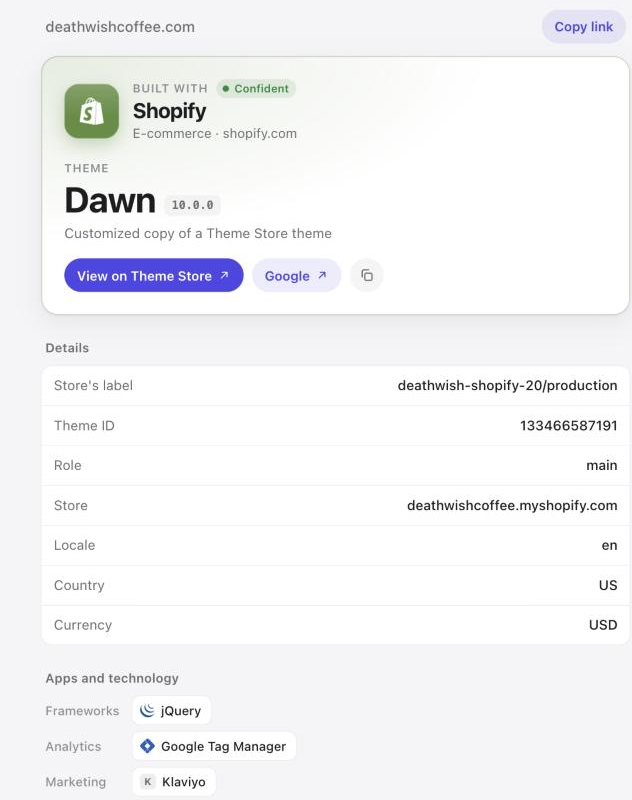
Detectors save time, but it helps to know where the answer comes from. That way you can check a surprising result yourself.
Method two: read the theme record in the page source
Open the store in Chrome or Safari, then view the page source with Ctrl+U on Windows or Option+Command+U on a Mac. Press Ctrl+F or Command+F and search for Shopify.theme. You will find a line like this:
Shopify.theme = {"name":"deathwish-shopify-20/production","id":133466587191,"schema_name":"Dawn","schema_version":"10.0.0","theme_store_id":null,"role":"main"};Each field tells you something different:
| Field | What it means | Can the store change it? |
|---|---|---|
| name | The label the store gave its theme | Yes, freely |
| schema_name | The theme's own internal name | Only by editing theme code |
| schema_version | The theme version the code is based on | Only by editing theme code |
| theme_store_id | The Theme Store listing the theme came from | No, but it is lost on copies |
| role | "main" for the live theme | No |
In the example above, the store renamed its theme to an internal build label, but schema_name still says Dawn and schema_version says 10.0.0. That is the answer: a customized copy of Dawn, Shopify's free default theme.
Method three: check the Theme Store ID
When theme_store_id is a number, the theme came straight from the Shopify Theme Store. Each official theme has its own ID, for example 887 for Dawn. Matching that number to the Theme Store gives you the exact listing, even when both the label and the schema name have been edited.
When theme_store_id is null, one of three things is true:
- The store uploaded a theme bought elsewhere, often from a marketplace like ThemeForest.
- The store downloaded a Theme Store theme and edited it, which removes the ID.
- The store runs a theme built from scratch by its own team or an agency.
Our guide to Shopify theme names walks through how to tell these apart.
When there is no theme to find
Some well known Shopify brands return no theme record at all. That usually means a headless storefront: the shop uses Shopify for checkout and inventory but renders its pages with a separate front end, such as Hydrogen or a custom Next.js site. There is no theme to buy in that case, because the design is custom software.
A store behind a password page also hides its theme until it opens, and a few stores block automated visits. In both cases a detector should tell you which situation you are looking at instead of failing silently.
What to do once you know the theme
If the theme is on the Theme Store, you can preview it with your own products and start a trial store. If it is a third party theme, search the theme name on the seller's marketplace. If it is a custom build, look at the sections and layout you like and find a Theme Store theme with similar features: most custom stores start from one.
Start your own Shopify storeStart with a free trial. Partner link.Frequently asked questions
Can you see what theme a Shopify store is using?
Yes. Every Shopify storefront publishes a Shopify.theme record in its page source with the theme's internal name, version and Theme Store ID. A detector reads it for you, or you can search the page source for "Shopify.theme".
Why does the theme name look strange?
The name field is the store's own label and can be anything. Look at schema_name for the theme's real identity, and at theme_store_id to match it to an official Theme Store listing.
What does theme_store_id null mean?
It means the theme did not come directly from the Theme Store. It may be a marketplace theme, an edited copy of a store theme or a fully custom build.
Is it legal to use the same theme as another store?
Yes, if you get the theme yourself. Buy or download it from the Theme Store or the theme's seller. Copying another store's edited theme files or its images is not allowed.
Keep reading
 ShopifyShopify Theme Names Explained: Store IDs, Schema Names and Custom BuildsThe three fields that decide what a Shopify theme is really called, and how to spot Theme Store themes, edited copies and custom builds.
 ShopifyHow to Find Which Apps a Shopify Store Is UsingHow to read the apps a Shopify store loads, and which ones top brands use most, from Klaviyo to Yotpo and Rebuy.
 ShopifyFamous Shopify Stores and the Themes They Actually UseReal scan results for 49 big Shopify brands: which run Dawn or Prestige, which built custom themes, and which went headless.